最近稍微看了一下推播通知的部分,這邊簡單分享一下我看的相關資源以及我的待看清單。XD
如果真的有實作有機會再補上筆記…
隨著行動和穿載裝置的興起,推播通知 (Push Notification) 成為維繫 App 用戶關係相當有力的工具。
簡單 4 步驟,App 推播不惱人還找回用戶的心
Service Worker
是一種由 Javascript 編寫的瀏覽器端代理腳本,位於瀏覽器和服務器之間(後台運行的腳本,環境與一般腳本不同),不能直接參與 web 的交互行為。Service Worker 的事件驅動和可以用來管理緩存,使得 web app 擁有與 native app 相同的離線體驗、消息推送、後台自動更新等體驗。
MDN ServiceWorker
Service Worker:讓網頁無網絡也能訪問
PWA 實踐:理解和創建 Service Worker 腳本
Progressive Web App (PWA)
Adding Push Notifications to a Web App
30 天 Progressive Web App 學習筆記
Firebase Cloud Messaging (FCM)
發送通知到 Android/ iOS 手機。
Google Cloud Messaging (GCM)
FCM 的前身。
我是跟著 Google Developers 的這篇 Adding Push Notifications to a Web App 照做的,步驟單純且很詳細。
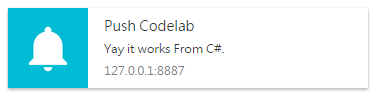
這邊可以參考不同語言的 Web Push 寫法,我是在 Webform 的 Button 用 C# 寫的,有成功 😀
protected void cmdQuery_Click(object sender, EventArgs e)
{
    var pushEndpoint = @"https://fcm.googleapis.com/fcm/send/cAKHtKxF4lI...";
    var p256dh = @"BGYGZ_M9LVg0Ib...";
    var auth = @"vE44l...";

    var subject = @"mailto:example@example.com";
    var publicKey = @"BK8juAE3Hgvqaef297gFJPm...";
    var privateKey = @"Qe8qv7BmIzxGOer70i4...";

    var subscription = new PushSubscription(pushEndpoint, p256dh, auth);

    var options = new Dictionary<string, object>();
    options["vapidDetails"] = new VapidDetails(subject, publicKey, privateKey);
    //options["gcmAPIKey"] = @"[your key here]";
    var payload = "{\"body\": \"Yay it works From C#.\",\"icon\": \"images/icon.png\",\"badge\": \"images/badge.png\"}";

    var webPushClient = new WebPushClient();
    try
    {
        webPushClient.SendNotification(subscription, payload, options);
    }
    catch (WebPushException exception)
    {
        Console.WriteLine("Http STATUS code" + exception.StatusCode);
    }
}